

Menu
Case Study
Vibe Coding a simple Game using Figma Make
AI Parrot Astrology - Build Guide (Figma Make + Supabase) with prompts & snippets
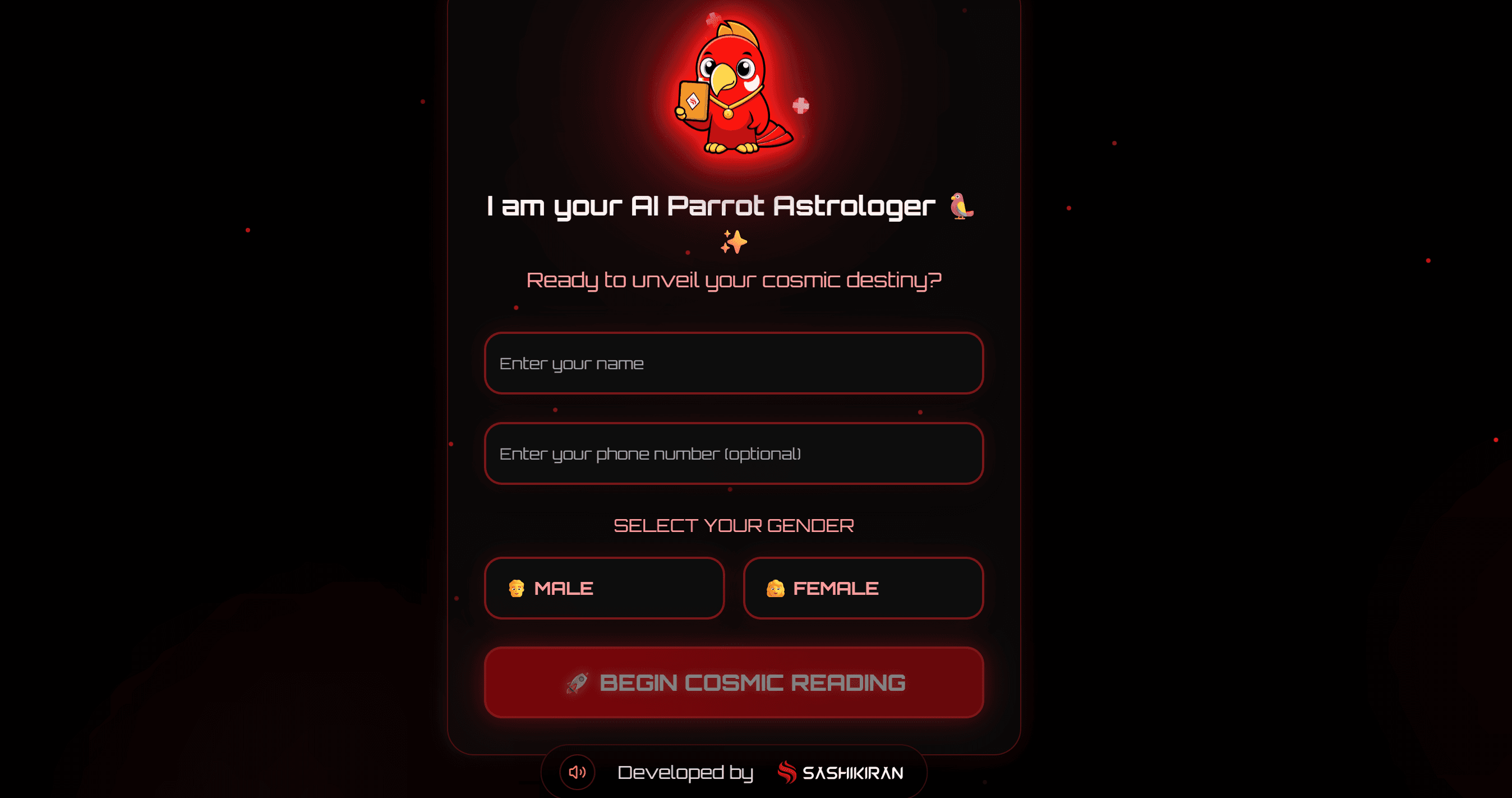
App Link : CLICK HERE
1) Overview & goals
Prototype: Red AI Parrot mini-game.
• Capture name, phone, gender.
• Pick whose fate to read (Me/Friend/GF).
• Shuffle → reveal funny fortune:
“Look like X, character of Y, name must change to Z.”
• Save/retrieve entries via Supabase.
• Share result on WhatsApp.
• Dark red modern theme + parrot animations.
2) Prerequisites
· Figma account with Make access.
· Supabase project + anon key.
· Assets: parrot, cards, optional music.
3) Project structure & variables
File: Red AI Parrot - downloaded from freepik as .png file.
4) Vibe coding on Figma Make starts now
Open Figma Make and paste these Prompts one by one and see how the app gets created.
Happy Vibe Coding !!!
PROMPT 1 -
Create an interactive game prototype called "AI Parrot Astrology Game".
It should feel like a playful carnival app with smooth animations, a red parrot mascot, and funny astrology card predictions.
Design in bright Indian cultural colors (reds, yellows, greens) with a festive, cartoonish theme.

GAME FLOW & SCREENS:

1. Welcome Screen
- Background: Vibrant carnival-style backdrop.
- Mascot: A friendly red parrot sitting on a perch, animated (wing flap or head tilt).
- Text: "Hello! I am your AI Parrot Astrologer 🦜✨"
- Inputs:
   a. Text input field for "Enter your name"
   b. Text input field for "Enter your phone number"
- Primary Button: "Start Reading"
- Animation: Button should bounce slightly on hover/tap. Parrot waves when user enters details.

2. Choice Screen
- Background: Same theme with variations (different festive border).
- Parrot: Moves closer and waves.
- Text: "Whose fate do you want to see today?"
- Buttons (stacked, large, playful):
   a. "My Name"
   b. "Friend’s Name"
   c. "Girlfriend’s Name"
- Animation: On button hover/tap → button expands slightly with color glow.
- If Friend or Girlfriend chosen: Show animated text field (slides in from bottom) with label "Enter their name" + button "Read Fate".

3. Card Shuffle Screen
- Scene: Table with 6 colorful tarot-style cards facedown.
- Parrot: Hops left and right excitedly above the cards.
- Text: "Let me shuffle the cards of destiny for you…"
- Animation: Cards should slide left-right or wobble slightly as if shuffling.
- After 2 seconds: Parrot taps one card (card enlarges slightly to indicate selection).

4. Card Reveal Screen
- Selected card flips open with a glowing effect.
- Inside the card, show a funny personalized prediction with this format:
  "You look like <Cine Hero>, you have the character of <Mahabharata Character>, and you will have to change your name to <Funny Name> so that people like you."
- The <Cine Hero> should randomly be one of: Rajinikanth, Shah Rukh Khan, Vijay, Ajith, Allu Arjun, Prabhas, Yash, Salman Khan, Aamir Khan, Hrithik Roshan, Dhanush, Kamal Haasan.
- The <Mahabharata Character> should randomly be one of: Arjuna, Karna, Krishna, Bhishma, Draupadi, Shakuni, Duryodhana, Yudhishthira, Abhimanyu, Ghatotkacha.
- The <Funny Name> should randomly be one of: Power Kumar, Disco Devi, Auto Raja, Chutki Singh, Chaiwala Ji, Samosa Rani, Gabbar 2.0, TikTok Thambi, Swagendra Singh, Ladoo Lal, Filter Coffee Boss, Rickshaw Raja, Emoji Kumar, Masala Devi, Dosa Don.
- Use big, playful typography and bright colors.
- Add extra fun: Before revealing, the parrot can show random dialogues like: "Hmm… destiny is speaking to me 🦜✨", "Oho! This card looks spicy 🌶️", or "Careful… this one is shocking 😂".

5. Result & Sharing Screen
- After prediction, show two buttons:
   a. "See Another Fate" → goes back to Card Shuffle and generates another random fortune.
   b. "Share on WhatsApp" → mock-up share popup appears with the prediction text + card image.
- Keep the parrot on screen, cheering the user.

Overall Style:
- Playful, lighthearted, humorous.
- Bright Indian fair/carnival colors: reds, yellows, greens.
- The parrot mascot should appear in every screen with slight variations (waving, hopping, pointing, cheering).
- Add simple animations for buttons, card flips, and parrot gestures.
- Make sure the prototype feels like a fun game, not a serious astrology app
PROMPT 2 -
Create a screen for the "AI Parrot Astrology Game" where a red parrot flips a fortune card.
When the card opens, it should show a playful prediction in the following format:

"You look like <Cine Hero>, you have the character of <Mahabharata Character>, and you will have to change your name to <Funny Name> so that people like you."

- The <Cine Hero> should randomly come from this list: Rajinikanth, Shah Rukh Khan, Vijay, Ajith, Allu Arjun, Prabhas, Yash, Salman Khan, Aamir Khan, Hrithik Roshan, Dhanush, Kamal Haasan.
- The <Mahabharata Character> should randomly come from this list: Arjuna, Karna, Krishna, Bhishma, Draupadi, Shakuni, Duryodhana, Yudhishthira, Abhimanyu, Ghatotkacha.
- The <Funny Name> should randomly come from this list: Power Kumar, Disco Devi, Auto Raja, Chutki Singh, Chaiwala Ji, Samosa Rani, Gabbar 2.0, TikTok Thambi, Swagendra Singh, Ladoo Lal, Filter Coffee Boss, Rickshaw Raja, Emoji Kumar, Masala Devi, Dosa Don.

Requirements:
- Show the parrot mascot animated as if opening or pointing at the card.
- Animate the card flipping before revealing the text.
- Display the prediction in large, colorful typography (fun and festive style).
- Add a "See Another Fate" button to generate another random combination.
- Add a "Share on WhatsApp" button below the card result (mock share flow).
- Use bright, playful colors with Indian cultural vibe (reds, yellows, greens).
- Make sure each time the user clicks "See Another Fate," a new random combination is generated from the lists above.

This should feel like a lighthearted, funny Indian carnival game prototype
PROMPT 3 -
Update the game title to **'Red AI Parrot'** in bold futuristic glowing red typography. Remove the subtitle text **'AI ASTROLOGY • COSMIC READINGS • DIGITAL DIVINATION'** completely, so only the new title remains centered. Ensure the title has a **glowing red neon effect** against the dark background, matching the mystical red smoke theme.

  Design a modern game UI in **dark mode with a red mystical theme** inspired by glowing red smoke on a black background. The interface should feel **futuristic, cinematic, and playful**. Use deep black backgrounds with gradients of crimson red and glowing neon highlights. Incorporate **glassmorphism-style cards** with soft transparency, glowing red edges, and smooth drop shadows. Add **animated transitions** where screens fade in/out with glowing smoke effects.

Typography should be bold, futuristic sans-serif with red and white contrast. Buttons should have rounded corners, glowing red outlines, and smooth hover animations. The parrot character should feel lively with subtle glowing feathers. Cards that the parrot reveals should look like **magical glowing tarot cards** with animated flips and spark effects.

Overall feel: **dark, premium, mystical, with red glowing accents** — blending fun and elegance, like a fusion of Indian astrology vibes and modern gaming UI
PROMPT 4 -
Connect this Figma Make prototype to my Supabase backend.

Supabase Project URL: <YOUR_SUPABASE_PROJECT_URL>
Supabase API Key: <YOUR_SUPABASE_ANON_KEY>
Table Name: fortunes

Table Schema:
- id (uuid, primary key)
- name (text)
- phone (text)
- gender (text: 'Male' or 'Female')
- created_at (timestamp, default now())

Integration Flow:

1. Welcome Screen
   - User enters "Name" and "Phone Number".
   - User also selects **Male / Female** via toggle buttons.
   - When user clicks **Start Reading**, insert a new row into the `fortunes` table with:
     { name: <entered name>, phone: <entered phone>, gender: <selected gender> }.
   - Show toast message "User saved ✅" after successful insert.
   - On error, show "Oops! Could not save ❌".

2. Choice + Card Shuffle Screens
   - Continue animations as usual (no Supabase call here).

3. Card Reveal Screen
   - Instead of saving predictions, just display the game fortune result (local).
   - Optionally, allow updating the row with some extra fields later (if needed, e.g., result type).

4. Reload / Resume
   - If a user reopens the game and enters the same phone number, fetch the most recent record (ordered by created_at desc) and prefill the form with { name, gender }
PROMPT 5 -
Fix the following UI bugs in the AI Parrot Astrology prototype for mobile screens:

1. Welcome Screen
- In the Male/Female toggle buttons:
  • Reduce font size of the labels "Male" and "Female" slightly so they fit neatly inside the boxes on small screens.
  • Alternatively, increase the width of the "Female" box slightly if needed so the text never overflows.

2. Friend’s Name Flow
- On the screen after selecting "Friend’s Name":
  • The button text "Unveil their cosmic path" is too large. Reduce the font size so the text fits fully inside the button with padding.
  • Keep button centered and balanced.

3. Card Shuffle and Card Reveal Screens
- Text "The destiny card for" (shuffle screen) and "<name> destiny revealed !" (reveal screen):
  • Reduce the font size slightly (e.g., 10–15% smaller) so the text does not dominate the screen and looks neat on mobile.
  • Maintain centered alignment.

4. Card Reveal Screen Buttons
- Replace the current "Amazing whats next" button with two buttons:
  • "See Another Fate" → loops back to card shuffle flow
  • "Share on WhatsApp" → triggers WhatsApp share intent

5. WhatsApp Share Intent
- When user clicks "Share on WhatsApp":
  • Trigger WhatsApp intent to share this text:
    "I tried AI parrot Astrology.. I recommend you to try too at https://source-swear-56270835.figma.site"
  • Open WhatsApp share popup with the above text prefilled.

Styling
- Keep the red-themed dark mode style.
- Ensure all buttons fit within mobile screen width with proper padding.
- Maintain playful parrot animations
PROMPT 6 -
Apply the following updates to the AI Parrot Astrology game prototype:

1. WhatsApp Share Message
- When the "Share on WhatsApp" button is clicked, trigger the WhatsApp intent with the following message:
  "I tried Sashikiran's AI Parrot Astrology.. I recommend you to try too at https://source-swear-56270835.figma.site .. For more *AI x UX NEWS* & updates, follow https://whatsapp.com/channel/0029VbARQ56FHWq7QXsf0u17"
- Ensure this text is prefilled in the WhatsApp share popup.

2. Branding with Logo
- Add branding with the text: "Developed by" + <logo image>
PROMPT 7 -
Update the AI Parrot Astrology prototype to include consistent branding on every screen.

Branding Requirements:
- Add a footer section at the bottom of every screen with the text:
  "Developed by Sashikiran.com"
- Place footer horizontally centered.
- Logo image should be small, scaled proportionally, and sit to the right of the text.
- Use subtle styling: light grey or faint red tint on dark mode background so it doesn’t overpower the main UI.
- Ensure footer spacing is consistent across all screens, slightly above the screen bottom edge.
- On mobile, footer should shrink responsively but always remain readable.

General:
- Maintain dark red glowing theme for the rest of the UI.
- Keep parrot animations and game flow unchanged
PROMPT 8 -
Enhance the AI Parrot Astrology prototype with continuous background music.

- Embed the YouTube video at https://www.youtube.com/watch?v=ggz7feykOGo&list=RDggz7feykOGo&start_radio=1 as an audio source.
- Set the embed to autoplay when the user enters the Welcome Screen.
- Loop the audio continuously until the user leaves the prototype or webpage.
- Hide the video UI completely so only the music plays in the background.
- Keep a small mute/unmute toggle in the footer across all screens so the user can control the music.
- Ensure playback works on both desktop and mobile web preview, without restarting on screen transitions
Connect to Content
Add layers or components to infinitely loop on your page.
Connect to Content
Add layers or components to infinitely loop on your page.
Connect to Content
Add layers or components to infinitely loop on your page.
For More informative Posts like this,
For More informative Posts like this,
Follow on
Follow on
Follow on










Sashikiran - IIM Alum
Gallery

Sashikiran - IIM Alum
Gallery
Sashikiran - IIM Alum
Gallery
© 2024. Designed by Sashikiran
© 2024. Designed by Sashikiran